FREE TEMPLATES
Best Sentence Note-Taking Method Template
Use this free, customizable Sentence Note-Taking Method Template to organize your notes, save time, and collaborate better—all in one place. Whether you’re capturing lecture points, documenting meeting discussions, or summarizing research, this template adapts to your needs and helps you keep information structured and easy to review.


What is a Sentence Note-Taking Method?
The Sentence Note-Taking Method is a very simple method where each new thought, fact, or idea is written on a new line in complete sentence form. Rather than clustering ideas or using brief notes, this method emphasizes overall clarity and completeness. Each sentence is a standalone point, making it easier to review your notes later. This is useful if you're taking notes during lectures, meetings, or training sessions when a large amount of information is presented or gone through rapidly.
Benefits of Using the Sentence Note-taking method
- Saves time by letting you document information quickly and continually.
- Increases accuracy because each line represents a complete thought or fact.
- Enhances comprehension by presenting ideas in a structured way.
- Supports review sessions since notes are already organized in sentences.
- Reduces confusion by separating each point clearly on its own line.
What should be included in the Sentence Note-Taking Method?
A good Sentence Note-Taking template captures essential details while providing enough structure for fast-paced note-taking.
Key Elements of the Sentence Note-Taking Method
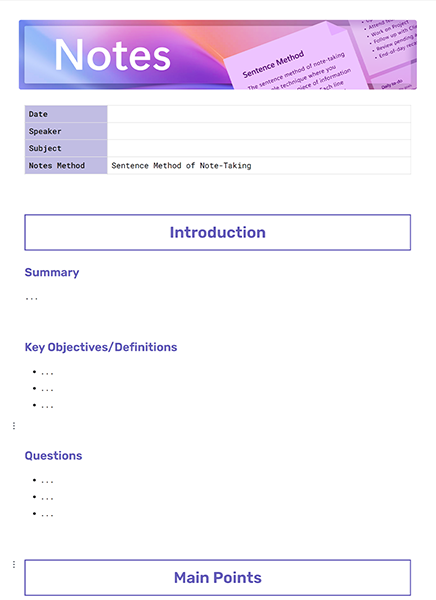
- Date – When the notes were taken.
- Speaker – The person delivering the information (lecturer, manager, trainer).
- Subject – The main topic or theme being covered.
- Notes Method – Indicating that the Sentence Method is used.
- Sentence # – A numbered line for each new thought or idea.
- Note / Summary Sentence – A clear, complete sentence for each key point.
How to use this Sentence Note-Taking Method
This sentence-based method is designed for clarity and speed. It allows you to keep pace with fast speakers while ensuring your notes remain readable and complete.
Steps to Use the Sentence Note-Taking Method
Step 1. Write the date, speaker, and subject at the top for easy reference.
Step 2. Indicate the Notes Method as “Sentence Method” for clarity.
Step 3. Start numbering each new idea or point on a separate line.
Step 4. Write each note as a full sentence to capture the complete meaning.
Step 5. Use additional lines for subpoints, examples, or supporting details.
Step 6. Review and refine—ensure your notes are clear and complete for later use.
What’s Inside This Sentence Note-Taking Method
This template is designed to simplify note-taking in lectures, meetings, and discussions. It provides a ready-to-use structure that keeps your notes organized, readable, and easy to review.
This Customizable Sentence Note-Taking Method Layout Includes
- Date – Log when the notes were taken for easy tracking.
- Speaker – Identify who delivered the lecture, meeting, or session.
- Subject – Write the main topic or theme being discussed.
- Notes Method – Clearly specify that the “Sentence Method” was used.
- Sentence Numbering – Pre-structured numbered lines for up to 10 key sentences.
- Note / Summary Sentence – Space to write each idea in complete sentence form.
- Tips for Use – Guidance to summarize clearly, use additional lines if needed, and keep one idea per sentence.
Why You Need a Sentence Note-Taking Method
The sentence method is more than taking down everything you hear—this template is a structured, organized, and more credible method to take notes. The sentence method ensures that each point is in complete sentences, so when you review your notes, you do not have to think or guess what you meant. This method helps you follow fast-paced lectures or meetings without losing critical details, and it gives you a structured record that supports better understanding, retention, and collaboration.
How to Fill Out a Sentence Note-Taking Method
To fill out this template, start by entering the date, speaker, and subject. Then, indicate the Sentence Method as your chosen format. As you listen, number each point, and write it out in a complete sentence. Make your sentences clear and concise, and use additional lines for details. After the session, carefully review your notes to make sure you are capturing complete thoughts and reviewing key points to help you study or report.
Who can use this Sentence Note-Taking Method
This template is versatile and can be used by:
- Students to capture lecture notes accurately.
- Teachers to model structured note-taking for their classes.
- Professionals to document meetings and discussions.
- Researchers & Writers to summarize articles, books, or talks.
- Teams to keep organized records of brainstorming sessions or workshops.
FAQs
Q.1 Why is the Sentence Note-Taking Method effective?
Because it forces you to write complete thoughts, making notes easier to review and understand later.
Q.2 When should I use this method?
It’s best for lectures, fast-paced meetings, or training sessions where capturing detail quickly is essential.
Q.3 Is it faster than other note-taking methods?
Yes, because you don’t need to structure or reorganize during the session—each idea is captured line by line.
Q.4 Where can I find a ready-to-use Sentence Note-Taking Template?
Right here! Use this free template to simplify your note-taking process.