FREE TEMPLATES
Best Mitigation Plan Template
Use this free, customizable Mitigation Plan Template to organize your work, save time, and collaborate better—all in one place. This template helps you identify potential risks, analyze their impact, and create actionable strategies to reduce or eliminate threats. Regardless of whether you're managing projects, running business operations, or developing long-term strategic plans, this tool helps you stay prepared for the unexpected.


What is a Mitigation Plan Template?
A Mitigation Plan Template is a structured document that helps teams manage risk proactively. Instead of acting only once a problem occurs, you identify risks in advance, analyze what might happen if a risk occurs, and determine what you can do to reduce the risk of impacts. This results in a smoother workflow, more effective resource allocation, and improved decision-making overall.
Benefits of Using a Mitigation Plan Template
- Awareness of possible risks: You can visualize what can go wrong and be prepared for it beforehand.
- Better decision-making: By identifying levels of risk, you can determine what issues to take action on first.
- More effective communication: Everyone on the team understands the risks and the management strategies.
- Time and resources: It is always more efficient to prevent an issue than to backtrack and fix them.
What should be included in the Mitigation Plan Template?
A good mitigation plan strikes a balance between risk assessment and actionable strategies. It captures risks in different categories, evaluates their likelihood and impact, and outlines how to deal with them effectively.
Key Elements of the Mitigation Plan Template
- Executive Summary - Summary overview of risks and mitigation strategies.
- Risk Identification - Types: Risks can be categorised as operational, financial, and strategic.
- Risk Analysis - Likelihood, impact, and the overall level of risk.
- Mitigation Strategies - Step-by-step processes that are explained in detail to mitigate risks.
- Implementation Plan – Roles, responsibilities, timelines, and resources.
- Monitoring & Review – Audits, feedback, and updates to keep the plan current.
How to use this Mitigation Plan Template
This template is easy to adapt to any project or business process. Follow a simple, step-by-step approach to make the most of it.
Steps to Use the Mitigation Plan Template
Step 1: Define your scope - Clarify what project, process or area the mitigation plan will focus on.
Step 2: Identify risk - Use categories such as operational, financial, or strategic to capture the range of risk.
Step 3: Assess risk - Assess likelihood and impact for each risk and aggregate the overall risk severity.
Step 4: Develop strategies - List risk developed risk mitigation strategies, including contingencies, contingency planning, and a variety of budget and timing monitoring.
Step 5: Assign responsibility - Clearly specify who will be responsible for implementing each strategy.
Step 6: Set timelines and resources - Identify milestone and budget requirements, along with what tools and team members will be used.
Step 7: Review and revise - Schedule regular audits, collect feedback, and revise risk mitigation strategies as necessary.
What’s Inside This Mitigation Plan Template
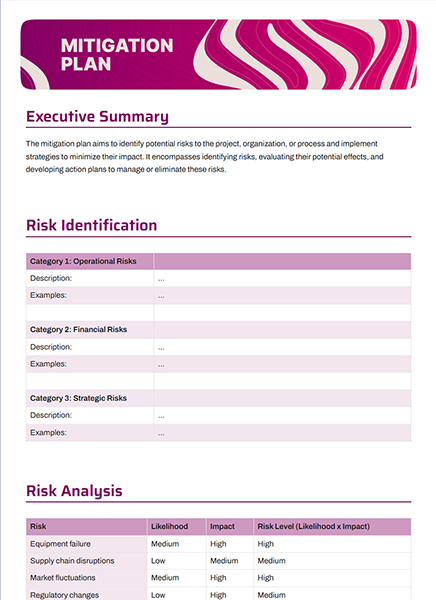
This ready-to-use template is structured to help you get started planning without having to start from scratch.
This Customizable Mitigation Plan Template Layout Includes
- Executive Summary section for quick insights
- A table that identifies risks, providing categories and examples.
- A matrix that analyzes risks, specifically likelihood, impact, and levels.
- Mitigation strategies that are grouped by risk type.
- A checklist for implementation that will identify roles and timelines.
- A monitoring & review plan that promotes continual improvement.
Why You Need a Mitigation Plan Template
Even a small risk can become a significant obstacle if there is no clear mitigative plan. Having a structured document will allow your team to be anticipatory, reduce uncertainty, and remain resilient. This way, you protect your goals, resources, and reputation.
How to Fill Out a Mitigation Plan Template
Start with the risk categories associated with your project before specifying risks. For each risk, assign likelihood, impact, and severity. Next, enter mitigation actions, conduct a responsibility assignment, and time frames. Revisit this information, and update regularly in order for your plan to remain useful.
Who Can Use This Mitigation Plan Template
This template is versatile and can be used by:
- Project managers who want to ensure deadlines aren’t derailed by risks.
- Business leaders looking to safeguard financial and strategic goals.
- Operations teams that need to prepare for supply chain or equipment challenges.
- Compliance officers who must address regulatory requirements.
FAQs
Q1. How detailed should a mitigation plan be?
It should be detailed enough to cover key risks, but simple enough for everyone to understand and use.
Q2. How often should I update my mitigation plan?
You should update it regularly—ideally after audits, project milestones, or whenever new risks emerge.
Q3. Can I use this template for small projects?
Yes, it’s scalable. You can simplify sections for small projects or expand them for complex initiatives.
Q4. Who should approve the mitigation plan?
Typically, project leads or senior management should review and approve the plan before implementation.